GoSweetSpot: WooCommerce Installation
Linking GoSweetSpot and WooCommerce Plugin
After finding the GoSweetSpot Shipping Options plugin on WordPress, you will need to first install it (click 'Install') to WooCommerce and then link it to GoSweetSpot.
To link it once installed, navigate to WooCommerce > Settings > Shipping > GoSweetSpot Shipping Options
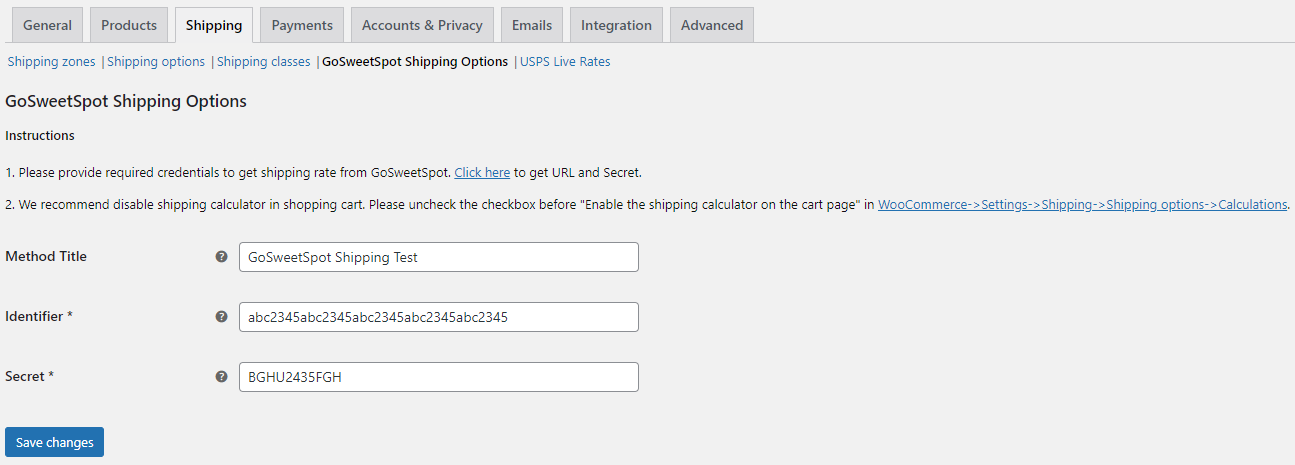
You will see the fields Method Title, Identifier and Secret. Method Title will have already been populated by you will need to enter in an Identifier and Secret. To get these values, click the 'Click Here' link displayed in the instructions (or navigate to it in GoSweetSpot) and copy the Identifier and Secret field values one by one from GoSweetSpot into the WordPress "GoSweetSpot Shipping Options" Plugin config page shown above.
Click the "Save Changes" button at bottom of the plugin config page. The two sites are now linked, but no rates will display until the zones have been set up with our plugin's shipping method.
Setting Up Shipping Rates & Zones
You will need to add the GoSweetSpot Shipping Rate method to the Shipping Zones in WooCommerce.
Navigate to WooCommerce > Settings > Shipping > Shipping zones and make sure you either have the shipping zone 'New Zealand' or leave it blank (displayed as 'Everywhere').*
Note: if you select specific NZ regions, a checkout rate will only apply to those regions. Also, if you have selected specific New Zealand regions, at checkout field called 'Region (optional)' will no longer be optional, as WooCommerce requires a region to be specified by the customer if your zone settings are also region specific. As such, we recommend selecting the 'New Zealand' zone or leaving the zone blank.
Click into the Zone(s), select the Add Shipping Method button at the bottom and choose GoSweetSpot Shipping Options from the dropdown list.

You may wish to remove your existing rates and test the results. Click here to go back to the main article on setting up GoSweetSpot Shipping Options for further information. See 'Step 6. Remove Existing Rates & Test'.
Important Things to Note
WooCommerce provides a shipping calculator that will display a rate before the final checkout page and before the customer has entered a complete address. We recommend disabling this shipping calculator because while it may work sometimes, without a complete address (street, suburb, state etc), we will not be able to validate rural or residential addresses reliably. To disable this, please uncheck the checkbox "Enable the shipping calculator on the cart page" in WooCommerce > Settings > Shipping > Shipping options > Calculations.
Related Articles
GoSweetSpot: Shopify Installation
Prerequisites Ensure you have read the shipping options article before continuing. Your Shopify plan may not allow Carrier Calculated Shipping by default. If you cannot add the GoSweetSpot Carrier Rate, you may need to contact Shopify (this is not a ...GoSweetSpot Custom Integrations
If your platform isn't listed on X or API Integration isn't suitable, you can also use the GoSweetSpot Local Connector The Local Connector is a utility application that can be installed on a PC/Server, for sending orders data from a source system to ...GoSweetSpot: Labels
Labels in Queue Description Queue a provided image file for printing via the print application. Requests Method: POST Content Type: application/json URL: https://api-docs.gosweetspot.com/docs/labels/post.html Headers access_key : your unique API key ...GoSweetSpot: Webhooks
Description GSS can provide feedback to your site using webhooks for certain action triggers. Actions that can be subscribed to include: Shipment created Shipment pickup registered by courier Shipment delivery registered by courier Shipment tracking ...GoSweetSpot: Shipments
Get Shipment Updates Description Get status updates for shipments. Requests Method: GET Content Type: application/json URL: https://help.nzcouriers.co.nz/gosweetspot-api-integration/gosweetspot-shipments Headers access_key : your unique API key ...